My smartwatch won't turn on or the screen stays blackUpdated 5 days ago
⚡ Step 1: Charge the watch correctly
- Use the original magnetic charging cable supplied with the watch. Junior and adult watch cables are not interchangeable.
- Use a charger of 5V maximum (no fast-charging adapter): a standard phone wall adapter or a computer USB port.
- Make sure the protective film or label has been removed from the watch screen.
- Clean the charging contacts with a dry cloth and check that the magnets attach to the watch (they must not repel each other).
- Charge for at least 3 hours.
- If you have another compatible original cable, try it as well.
🔲 My watch won't turn on at all
The screen is completely black and the watch doesn't respond or vibrate
- Charge for at least 3 hours as described in Step 1.
- Press and hold the side button (crown) for 30 seconds.
- If the watch powers on → perform a Factory Reset to prevent recurrence (Settings → Factory Reset).
- If the watch still doesn't respond → try another compatible original cable, then contact our customer service.
📳 The screen stays black but my watch vibrates or is still detected by my phone
This is often a brightness setting issue. Charge the watch as described in Step 1, then follow the brightness test for your watch. Keep the watch plugged into its original charging cable during the whole test.
ICE smart (adult watches)
- Charge the watch for 30 minutes with its original cable.
- Without unplugging the cable, press the crown (power button) to access the home screen, even if the screen stays black.
- Swipe down, then tap once in the upper-middle/right corner to open the brightness setting.
- Slide your finger from bottom to top in the middle of the screen to increase the brightness.
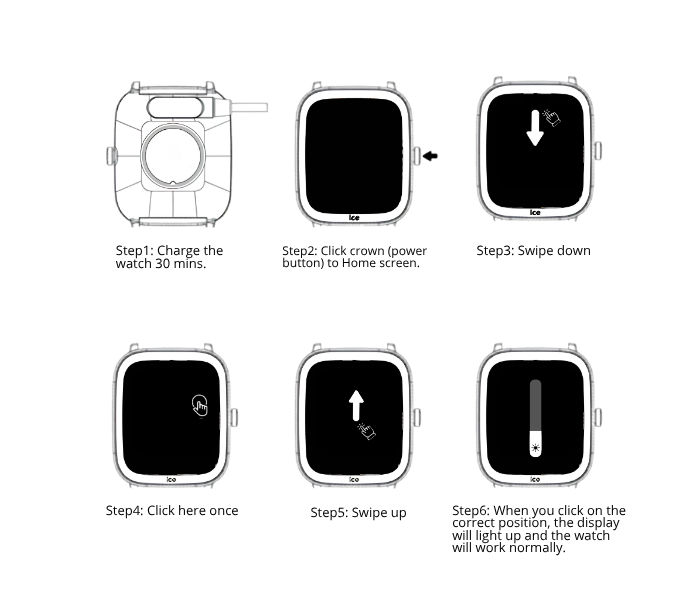
If it still doesn't work and the watch is still connected in the app, you can also reset it from the app (the exact menu name depends on the app). If it still doesn't work, follow Step 1 again and contact our customer service.
ICE smart junior (children's watches)
- Keep the watch on its original cable and charge for 30 minutes.
- Press the crown (main button) to access the home screen, even if the screen remains black.
- Swipe down from the top of the screen, then tap 1 to 3 times in the upper right corner to increase brightness.

On round ICE smart junior RD models: press the power button, swipe down, tap the middle-right area, then swipe up.
If it still doesn't work and the watch is still connected in the app, you can also reset it from the app (the exact menu name depends on the app). If it still doesn't work, follow Step 1 again and contact our customer service.
❓ Still not working?
Contact our customer service with:
- Your watch model and 6-digit reference number (on the back of the box or on your invoice, more rarely on the back of the watch; it never contains letters)
- Your proof of purchase
- Since when the problem exists and the steps already attempted
- A short video of the watch on its original cable, showing the charge indicator or its absence