My ICE Smart Junior seems turned off or the screen is blackUpdated an hour ago
If your child’s watch seems not to turn on or if the screen appears completely black, don’t worry.
👉 In most cases, this is not a defect, but a sudden drop in screen brightness.
When the brightness is set to the lowest level, the screen can look completely off, even though the watch is still working normally.
✅ How to fix the brightness issue (ICE Smart Junior)
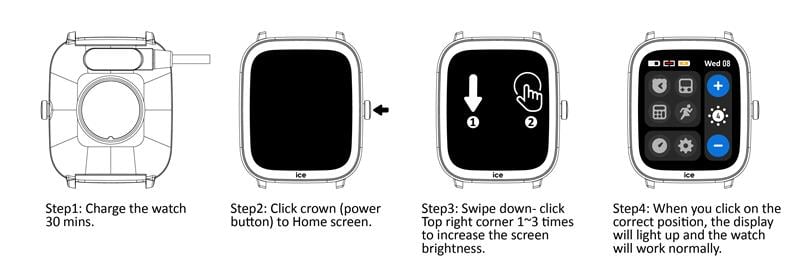
Please follow the steps below carefully. In most cases, this will restore the display.
Step 1 – Charge the watch
- Connect the watch to the charger and let it charge for at least 30 minutes.
Step 2 – Access the home screen
- Press the crown (power button) once to access the home screen,
even if the screen still appears black.
Step 3 – Increase screen brightness
- From the home screen, swipe down.
- Then tap on the top‑right corner of the screen, 1 to 3 times, to increase the brightness.
👉 Even if you don’t see anything at first, the gesture still works.
Step 4 – Check the result
- When you tap the correct area, the screen will turn on immediately.
- The watch should now function normally.
ℹ️ Why does this happen?
The brightness level can be reduced unintentionally during normal use by a child.
When set to the minimum, the screen becomes almost invisible, especially indoors or in low‑light environments.