My smartwatch won't turn on or the screen stays blackUpdated 3 months ago
⚡ Step 1 — Charge the watch first
Before anything else, connect the watch to its original magnetic charging cable and charge for at least 30 minutes. Clean the charging pins with a dry cloth if needed.
💡 Always use the original cable — third-party cables may not charge the watch correctly.
🔲 My watch won't turn on at all
The screen is completely black and the watch doesn't respond
- Charge for 30 minutes with the original cable.
- Press and hold the side button (crown) for 10 seconds to force a restart.
- If the watch powers on → perform a Factory Reset to prevent recurrence (Settings → Factory Reset).
- If the watch still doesn't respond → contact our customer service.
📳 My watch vibrates but the screen stays black
The watch seems alive but the screen won't light up
This usually means the battery is critically low or a firmware update was interrupted.
- Charge the watch for at least 1 hour without interruption.
- After 1 hour, press and hold the side button for 10 seconds to force a restart.
- If the screen lights up → the watch is working. Perform a Factory Reset if the issue recurs.
- If the screen stays black despite vibrating → the screen may need servicing. Contact our customer service.
⚠️ If a firmware update was in progress when the issue occurred, do not attempt to update again until the watch is fully charged and responsive.
💡 ICE Smart Junior — special procedure (screen black after long inactivity)
- Charge for 30 minutes using the original cable.
- Press the crown (main button) to access the home screen — even if the screen remains black.
- Swipe down from the top of the screen, then tap 1 to 3 times in the upper right corner to increase brightness.
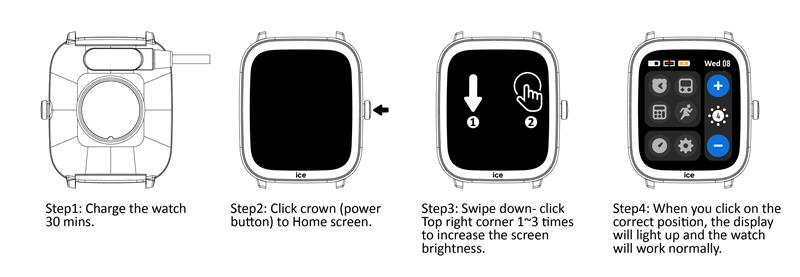
Video tutorial 👇
If the screen lights up after this → close the ticket. If not → contact our customer service for a warranty assessment.
❓ Still not working?
Contact our customer service with:
- Your watch model and 6-digit reference number (back of the watch)
- Description of what happened and steps already attempted
- Photos or video of the issue